
Product design & development
Project Time Tracking Tool
A fully self-contained, web-based time tracking tool designed specifically for freelance design work. Built to replace manual time logging across multiple projects, it enables seamless, distraction-free time capture with instant timesheet export—all local, no backend, and no subscription required. The tool eliminates calculation errors, minimizes workflow friction, and automates previously tedious tracking tasks.
ROLE(S): UX/UI + Product Designer (Product concept, UX flows, UI design, PRD creation, AI-assisted build direction)
TOOLS: Figma, CHATPRD, CLAUDE
The Problem:
Designers rarely work on a single project at a time. Instead, the day is fragmented, switching between clients, tasks, and priorities.
Tracking that time then becomes a separate job:
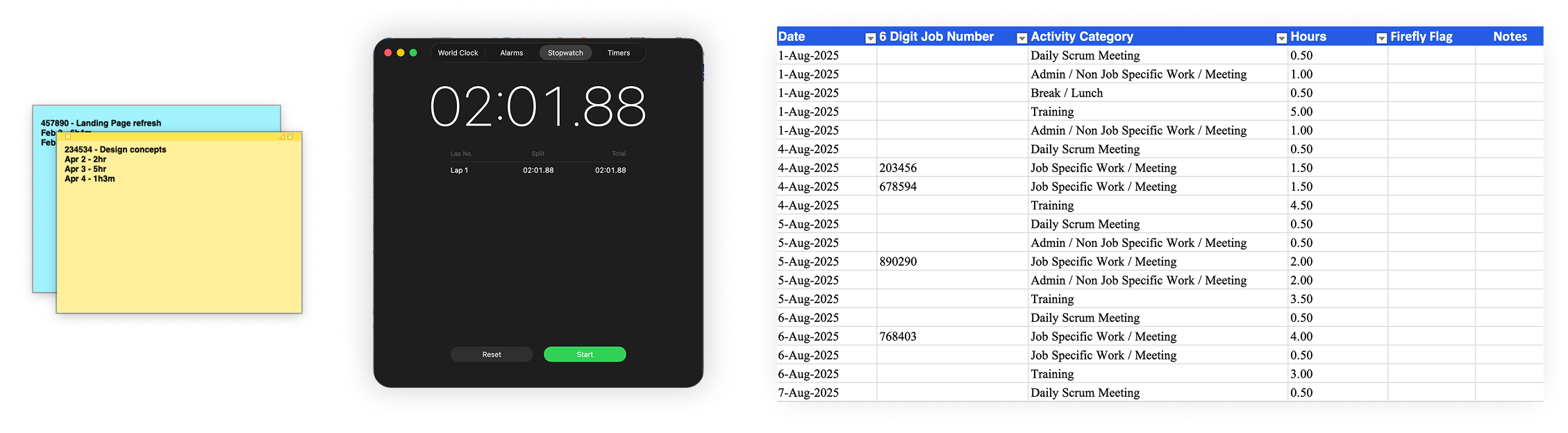
Manually logging time in notes, docs, or apps
Reconstructing hours at the end of the day (or worse, the month)
Performing mental math across scattered entries
Forgetting to start/stop timers when switching tasks
The result:
Lost billable hours
Inconsistent tracking methods
Cognitive overload throughout the day
Low trust in final timesheets
The goal was simple: make the log build itself, so there's nothing to remember and nothing to lose.
The goal:
Design a system where:
Time tracking happens passively alongside work
Switching between projects is frictionless - smooth is fast
The log builds itself in real time
Exporting a timesheet is instant and accurate
Neurodivergent friendly: less friction, less guessing, less interaction, dark mode and clean UI.
Key Features & Design Decisions:
1. One-Click Project Switching
Start/stop timers with a single interaction
Switching projects automatically stops the previous timer
Why it matters:
Eliminates the most common failure point: forgetting to stop one task before starting another.
2. Passive Time Accumulation
Time logs build continuously in the background
No need to manually enter durations
Impact:
Removes mental overhead and eliminates estimation-based tracking.
3. Local-Only Data Storage
Uses browser local storage
No accounts, no cloud dependency, no third-party app to wait a year for approval
Instant load, zero setup
Full user control over data
No privacy concerns
4. Bulk Actions + Archive System
Multi-delete, archive completed projects
Keeps active workspace clean
Impact:
Supports long-term usability without clutter.
5. Instant Timesheet Export
Generates structured output for billing
Removes need for manual formatting or calculations
Result:
Transforms end-of-month work from hours → seconds.
The Process:
1. Problem Definition
Mapped current workflow pain points from real-world freelance tracking habits:
Sticky notes
Scattered tools
End-of-day reconstruction
2. UX Concepting (Figma)
Defined branding + design system
Designed simple, scalable UI with clear active states
Prioritized visibility of “what’s currently running”
3. PRD Creation (ChatPRD)
Translated my ideal UX into structured product requirements
Defined feature logic (timers, switching behavior, exports)
4. AI-Assisted Build (Claude)
Directed implementation using structured prompts
Iterated on functionality + UX alignment with small batch user tests
The Outcome:
Eliminated manual time calculation entirely.
Created a reliable, real-time source of truth for billing.
That integrates naturally into daily workflows, and auto populates assigned projects from daily scrum reports.
With a mini breakpoint for smaller screens.
And a JSON export for backup and recovery.
Solution Overview & Takeaway:
A lightweight, browser-based tool that:
Tracks time per project with one-click toggles
Automatically pauses/starts timers when switching tasks
Stores all data locally (no login, no backend)
Generates clean, export-ready timesheets instantly
The most effective productivity tools don’t ask users to change behavior, they remove the need to think about the task at all.
This tool succeeds by turning time tracking from an active responsibility into a passive system.